


Google Data Studio is a fantastic dashboard application which allows you to distil huge amounts of data from multiple sources into a single, cohesive application. It enables marketers to combine data and display it in a non-technical format using charts, graphs, tables and split content up into distinct pages.
Another great feature is the ability to set up a report to update automatically each month and schedule the delivery of the report to suitable stakeholders. The data can be automatically refreshed if you use one of the native connectors such as Google Analytics, Google Search Console, YouTube etc.
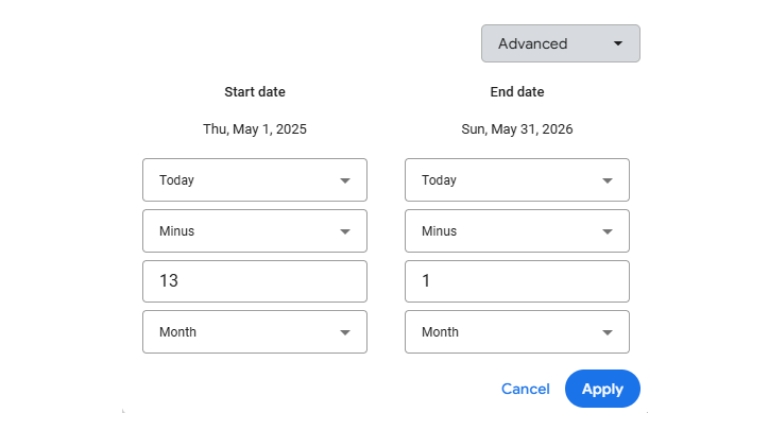
Google Data Studio Dynamic Dates
The date range for each of your elements should use dynamic dates to allow the content to update automatically. Select the element and then in Date Range, select Advanced. Inside the date popup, choose “today“, “minus“, “13“ and “month“. Repeat this for the end date, except set the number to “1“. This will set the start and end date from this month back to the previous year and will automatically update the content on a monthly basis. This could be amended to show data on a weekly, monthly, quarterly or yearly basis.
Once your report is set up to update automatically, it is ready to be scheduled for your client or work colleagues. To set up the scheduling, you need to:
- First, go to “Share“ in the top right, then click “Schedule Delivery“ and then click “Create Delivery“.
- In the recipient “To“ box, enter the email addresses of each person or group you want to send the report to. “Pages” is set to all pages by default.
- Set the “Start Date“ of sending the report to the 3rd of the month.
- Set the “Repeat“ delivery of the report to suit your future plans e.g. every week on a specific day, once a month etc. For a monthly report, set the “Repeat“ box to “Custom“ and set the schedule to “every 1 month on the 3rd day“.
- The “Time“ can be set to a specific time of the day, along with the TimeZone, to ensure your time is accurate. 10AM UK GMT is suitable for my clients and work colleagues.
- Finally, click “Schedule“ to complete the process.
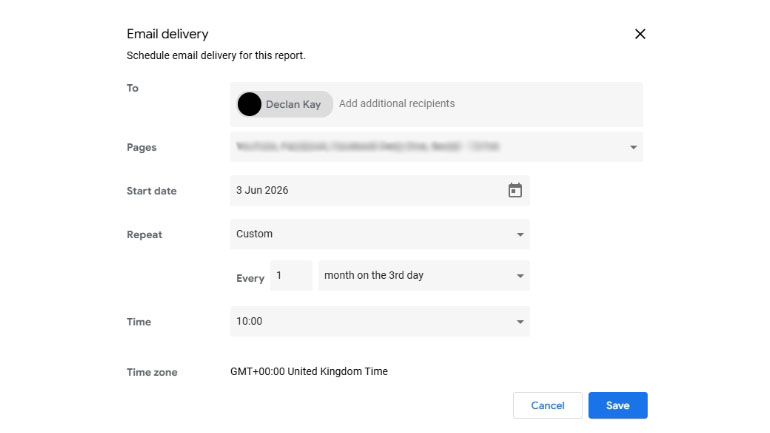
Schedule Your Monthly Report
Now the report is scheduled, you can now automate the delivery of the report within your regular schedule. This brings consistency to the reporting schedule so you, your colleagues or clients can avoid the administration of making the report and instead simply focus on the insights the report provides.
What’s the Chat?